Onesti
Onesti
|
Nou pe simpatie:
Sophya
 | Femeie
25 ani
Bucuresti
cauta Barbat
25 - 54 ani |
|
|
OnestiInregistrareLoginPozeNu sunteti logat. Lista Forumurilor Pe Tematici
|
| #1 |
|
|
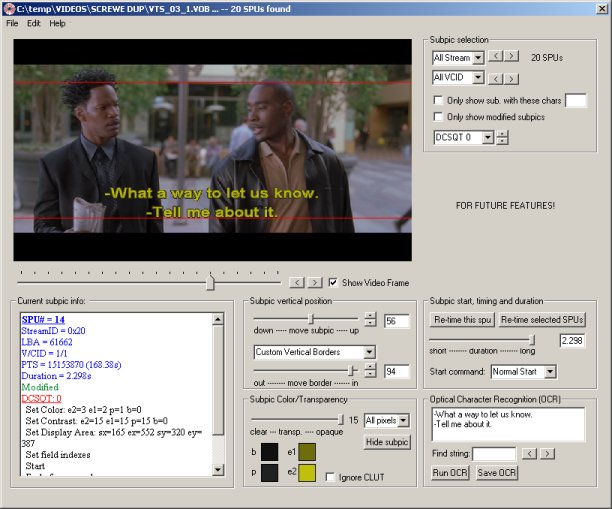
DVDSubEdit allows you to visualize and make modifications to the subpics (subtitles or button highlights in menus) directly inside the VOB files, without the need to demux and remux the subpic stream.
2006-03-15
Latest changes:
* Added code to select an area in the OCR output and erase it (both in the OCR output, and the bitmap).
* Added option to automatically remove text like "Man:" in subtitles
* Added option to adjust word detection in the OCR setup panel.
* Added Letterboxed and Pan&Scan video display modes for 16:9 material.
* Added text in stream select to indicate which display mode(s) each stream is intended for.
* Added option to only show forced subpics.
* Added a check box to show the I-frame closest to the selected SPU end time (duration slider).
* Added a smarter check for figuring out the video format when loading a .sup file.
* Added a warning in the log file if closed-captions are detected in the MPEG stream.
* The function to remove hearing-impaired text now runs in its own thread.
* Pressing Alt or Ctrl while dragging a subpic allows horizontal-only or vertical-only moves.
* Fixed OCR problems. The list is too long to show.
* Fixed a crash that could happen in 1.1 if you moved a subpic all the way down.
* Fixed a problem with the borders not adapting with PAL/NTSC video format
* Fixed a scaling problem that cause the subpics to be slightly cropped in no-video, full-screen mode.
* Fixed the safe-area values for the borders. Thanks to r0lZ for the help!
* Fixed the "keyboard input problem" (after a threaded operation (OCR for example) the shortcuts didn't work).
* Fixed once and for all the progress dialog not disappearing if a threaded operation finishes while the app is minimized.
471.1 KB
Download
Freeware
Oficial site
|
|
| |
|